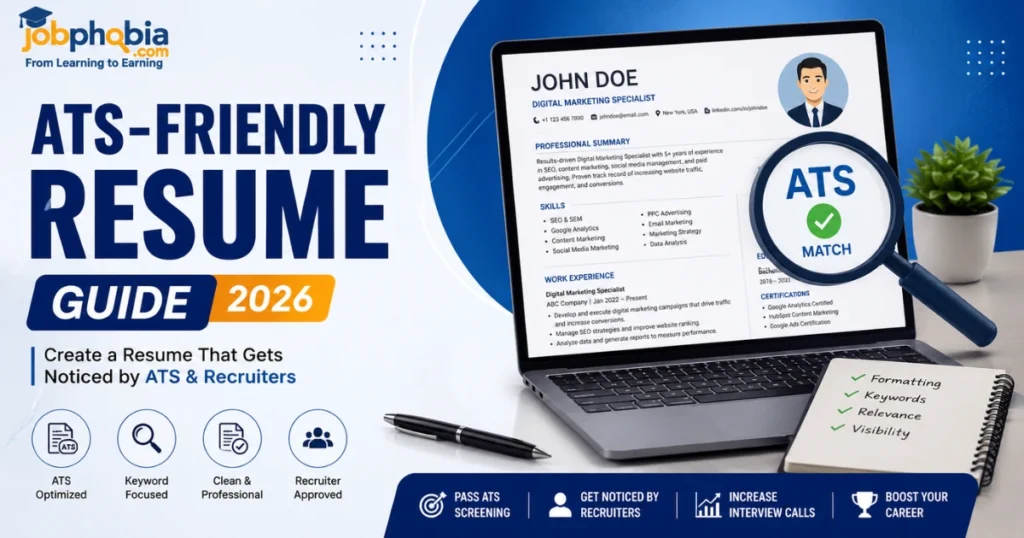
Landing your dream job often starts with a resume that gets noticed, but many applicants never make it past the first screening. Most companies today use Applicant Tracking Systems (ATS-friendly resume) to scan resumes before a recruiter even sees them. If your resume isn’t optimized for these systems, it may be rejected regardless of your qualifications. Creating an ATS-friendly resume ensures that your skills, experience, and achievements are correctly identified by the software, increasing your chances of getting shortlisted. In this comprehensive 2026 guide, you’ll learn how to build a resume that not only passes ATS scans but also impresses hiring managers and helps you secure more interviews.
What Is an ATS-Friendly Resume?
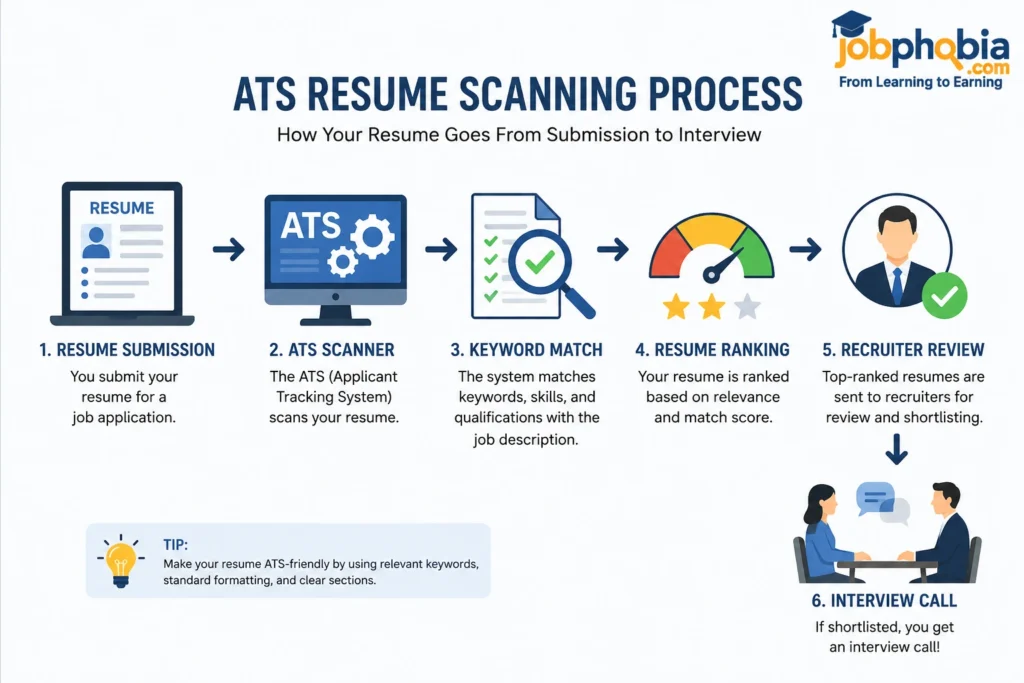
An ATS-friendly resume is a resume specifically designed to be easily read and understood by an Applicant Tracking System (ATS), which is software used by employers to filter and organize job applications. Instead of reviewing every resume manually, many companies rely on ATS to scan documents for relevant keywords, skills, qualifications, and experience before passing them on to recruiters.
When you submit your application online, the ATS extracts information such as your contact details, work history, education, and technical skills. If your resume uses complicated layouts, graphics, tables, or unusual fonts, the system may struggle to read the content correctly. As a result, even highly qualified candidates can be overlooked simply because their resumes are not optimized for ATS.
An ATS-friendly resume focuses on clarity, simplicity, and relevance. It uses standard section headings like Professional Summary, Work Experience, Skills, Education, and Certifications, along with job-specific keywords that match the employer’s requirements. This allows the software to accurately identify your qualifications and rank your profile higher during the screening process.
For example, if a company is hiring a Digital Marketing Executive and the job description mentions skills such as SEO, Google Analytics, Content Marketing, and Social Media Management, including these terms naturally in your resume can improve your chances of passing the ATS scan.
Creating an ATS-friendly resume doesn’t mean stuffing it with keywords or making it look robotic. Instead, it means presenting your qualifications in a clean, professional format that is easy for both software and human recruiters to understand. By following ATS best practices, you significantly increase the likelihood of getting shortlisted and moving on to the interview stage.
Why Is an ATS-Friendly Resume Important?
- In today’s competitive job market, submitting a well-written resume is no longer enough. Most medium and large companies use Applicant Tracking Systems (ATS) to manage thousands of job applications efficiently. Before a recruiter reviews your profile, the ATS scans your resume to determine whether it matches the job requirements.
- If your resume is not ATS-friendly, important information such as your skills, work experience, or qualifications may not be recognized correctly. This can result in your application being filtered out, even if you are perfectly qualified for the position.
- An ATS-friendly resume improves your chances of getting noticed by using clear formatting, relevant keywords, and standard section headings. It helps the software accurately read your information and increases the likelihood of your resume reaching a hiring manager.
- For job seekers, this means more interview opportunities and a better chance of landing the right role. Whether you are a fresher applying for your first job or an experienced professional looking for career growth, optimizing your resume for ATS can make a significant difference in your job search.
- Think of your resume as your first impression. If it successfully passes the ATS screening, you have already taken the first step toward securing an interview and standing out from other candidates.
Key Elements of an ATS-Friendly Resume
Creating an ATS-friendly resume is not just about using the right keywords—it’s about organizing your information in a way that both the Applicant Tracking System (ATS) and hiring managers can easily understand. A well-structured resume increases your chances of passing the initial screening and making a strong first impression.
Here are the essential elements every ATS-friendly resume should include:
1. Professional Contact Information: Start your resume with your full name, phone number, professional email address, LinkedIn profile (optional), and current location. Make sure these details are placed at the top of the document and avoid adding them inside headers or footers, as some ATS software may not read them correctly.
2. Compelling Professional Summary: Write a short 2–4 line summary that highlights your experience, key skills, and career goals. Include relevant keywords from the job description naturally to improve ATS compatibility while giving recruiters a quick overview of your profile.
3. Relevant Skills Section: Create a dedicated Skills section that lists both technical skills and soft skills related to the position. For example, if you’re applying for a digital marketing role, include skills like SEO, Google Analytics, Content Marketing, PPC, Communication, and Team Collaboration where appropriate.
4. Detailed Work Experience: Mention your previous jobs in reverse chronological order, including your job title, company name, employment dates, and key achievements. Use bullet points and action verbs to describe your responsibilities and quantify results whenever possible.
5. Education Details: Include your degree, institution name, graduation year, and relevant academic achievements. Freshers can also mention coursework, projects, or internships that demonstrate their capabilities.
6. Certifications and Training: If you have completed any professional certifications, list them in a separate section. Certifications from platforms like Google, Microsoft, Coursera, Udemy, or LinkedIn Learning can strengthen your profile and add valuable keywords to your resume.
7. Projects and Achievements: Adding relevant projects or accomplishments helps showcase practical experience. Briefly explain your role, the technologies or skills used, and the outcome achieved. This section is especially valuable for freshers and career changers.
8. ATS-Friendly Formatting: Keep your formatting simple by using standard fonts such as Arial, Calibri, or Times New Roman, clear headings, and bullet points. Avoid excessive graphics, text boxes, icons, and complicated layouts that may confuse ATS software.
9. Job-Specific Keywords: Customize your resume for every application by incorporating keywords directly from the job description. This helps the ATS identify your resume as a strong match while keeping the content relevant and natural.
10. Error-Free Content: Before submitting your resume, carefully proofread it for spelling mistakes, grammar errors, and formatting inconsistencies. Even a small error can create a negative impression on recruiters and reduce your chances of being shortlisted.
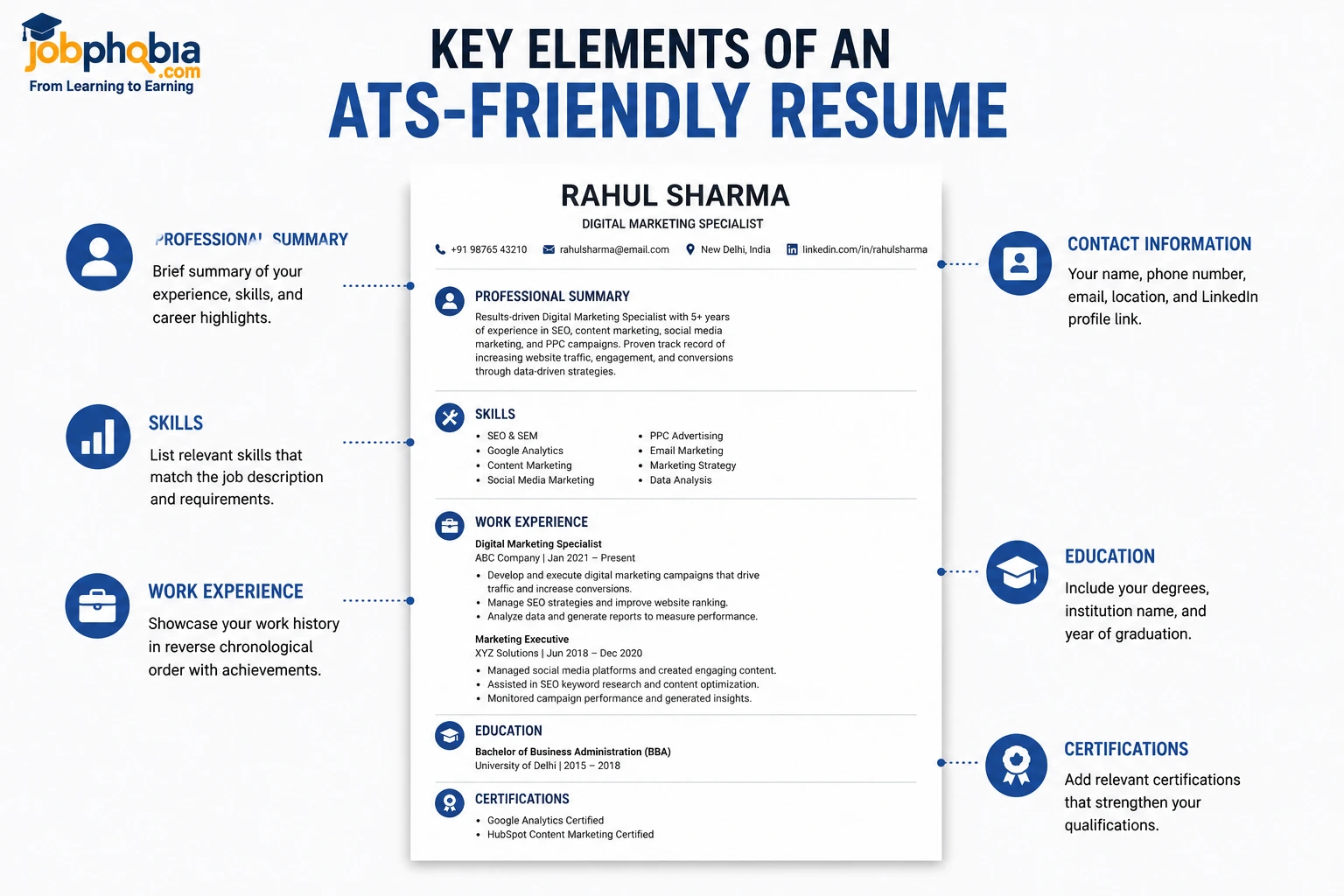
By including these key elements, you create a resume that is not only optimized for ATS software but also professional, easy to read, and appealing to hiring managers. A balanced combination of clear structure, relevant keywords, and quality content can significantly improve your chances of getting interview calls.
Best Resume Format for ATS-Friendly Resume
Choosing the right resume format is essential for passing an ATS-Friendly Resume. A clean and well-structured layout helps the software read your information accurately and improves your chances of getting shortlisted.
- Reverse Chronological Resume: This is the most ATS-friendly format and is recommended for most job seekers. It lists your latest work experience first, making it easy for recruiters to review your career progression.
- Functional Resume: This format focuses on skills rather than work history. It can be useful for career changers but may not perform as well with all ATS software.
- Hybrid Resume: A combination of skills and work experience, the hybrid format is suitable for professionals who want to highlight both their expertise and career history.
For the best results, use a reverse chronological resume with simple formatting, standard headings, and relevant keywords to maximize ATS compatibility.
📊 ATS-Friendly Resume Quick Reference Table
| Feature | Best Practice | Avoid |
| Resume Format | Reverse Chronological | Complex or Creative Layouts |
| Font Style | Arial, Calibri, Times New Roman | Decorative or Script Fonts |
| Font Size | 10–12 pt | Too Small or Too Large |
| File Format | PDF or DOCX (as requested) | Unsupported File Types |
| Section Headings | Standard Headings (Skills, Experience, Education) | Custom or Unclear Titles |
| Keywords | Use Relevant Job Description Keywords | Keyword Stuffing |
| Graphics & Icons | Keep Minimal or None | Heavy Graphics and Icons |
| Tables & Text Boxes | Use Simple Formatting | Complex Tables and Text Boxes |
| Resume Length | 1 Page (Freshers), 2 Pages (Experienced) | Overly Long Resumes |
| Contact Information | Name, Phone, Email, LinkedIn | Missing or Incomplete Details |
| Work Experience | Use Bullet Points with Achievements | Large Paragraphs |
| Proofreading | Check Grammar and Spelling | Typos and Formatting Errors |
Pro Tips to Create an ATS-Friendly Resume
- Customize your resume for every job application instead of using the same version everywhere.
- Use keywords naturally from the job description to improve ATS matching.
- Choose simple fonts like Arial or Calibri for better readability.
- Keep the layout clean with clear headings and bullet points.
- Highlight measurable achievements instead of listing only responsibilities.
- Avoid graphics, icons, and unnecessary design elements that ATS may not read correctly.
- Proofread your resume carefully to eliminate spelling and grammar mistakes.
- Save your resume in the format requested by the employer, usually PDF or DOCX.
- Keep your contact information updated so recruiters can reach you easily.
- Review and update your resume regularly to reflect your latest skills and experience.
Important Link for Updates
| Platform | Details |
|---|---|
| ➡️WhatsApp Channel | Click Here |
| ➡️Telegram Page | Click Here |
| ➡️LinkedIn Page | Click Here |
| ➡️Facebook Group | Click Here |
Some Useful Links
| Section | Useful Links |
|---|---|
| Courses for Skill Development | View All Courses |
| General Knowledge – National Parks | National Parks in India |
| General Knowledge – First in India | Top 100 Questions on “First in India” with Answers |
| General Knowledge – Ancient History MCQs | Indian Ancient History MCQs Quiz |
| General Knowledge – Indian Polity MCQs | Indian Polity MCQs Quiz |