Creating a professional Fresher Resume Format is one of the most important steps toward landing your first job. As a fresher, you may have limited work experience, but a well-structured and ATS-friendly resume can effectively highlight your education, skills, internships, projects, and achievements. Recruiters often spend only a few seconds reviewing each resume, so presenting your qualifications in a clear and organized format is essential. In this complete 2026 guide, you’ll learn how to create the best fresher resume, understand the ideal resume structure, explore a free ATS-friendly template, and discover practical tips to improve your chances of getting shortlisted for interviews.
What Is a Fresher Resume?
A Fresher Resume is a professional document designed for students, recent graduates, and job seekers with little or no work experience. It showcases your educational qualifications, technical skills, internships, academic projects, certifications, and achievements to demonstrate your potential to employers.
Unlike an experienced resume, a fresher resume focuses more on your knowledge, transferable skills, and career goals rather than previous employment. A well-structured Fresher Resume Format also improves your chances of passing Applicant Tracking Systems (ATS), making it easier for recruiters to find relevant information and shortlist your application.
Whether you’re applying for your first full-time job, internship, apprenticeship, or campus placement, using the right resume format can help you create a positive first impression and increase your interview opportunities.
📥 Free Resume Template Section
📄 Download Free ATS-Friendly Fresher Resume Templates
Looking for a ready-to-use resume? Download professionally designed ATS-friendly fresher resume templates and customize them according to your skills and career goals.
Free Resume Templates:
- Microsoft Office Resume Templates: https://create.microsoft.com/en-us/templates/resumes
- Canva Resume Templates: https://www.canva.com/resumes/templates/
Why Is a Fresher Resume Important?
A well-designed Fresher Resume Format plays a crucial role in creating a positive first impression on recruiters. Since freshers usually have little or no professional work experience, a resume becomes the primary document that showcases their education, technical skills, certifications, internships, projects, and achievements.
A professional resume not only highlights your qualifications but also demonstrates your communication and organizational skills. It helps recruiters quickly understand your strengths and determine whether you’re a suitable candidate for the role.
In today’s hiring process, many companies use Applicant Tracking Systems (ATS) to screen resumes before they reach recruiters. An ATS-friendly fresher resume with a clean layout, relevant keywords, and proper formatting improves your chances of passing the initial screening and getting shortlisted for interviews.
Whether you’re applying for campus placements, internships, government jobs, or private sector opportunities, investing time in creating a strong Fresher Resume Format can significantly increase your chances of landing your first job.
The table below compares a professional ATS-friendly fresher resume with a poorly designed resume, helping you understand why proper formatting and structure are essential for job applications.
| 🌟 Professional Fresher Resume | ❌ Poorly Designed Resume |
|---|---|
| ✅ Clean and ATS-friendly layout | ❌ Cluttered and unorganized design |
| 🎯 Highlights relevant skills | ⚠️ Includes unnecessary information |
| 👀 Easy for recruiters to scan | 😕 Difficult to read quickly |
| 📑 Uses clear headings | 📄 Inconsistent formatting |
| 🚀 Increases interview chances | 📉 May get rejected during screening |
Best Fresher Resume Format
Choosing the right Fresher Resume Format is essential for making a strong first impression on recruiters. A clean and well-organized resume not only improves readability but also increases your chances of passing an Applicant Tracking System (ATS). Most recruiters prefer resumes that are simple, professional, and easy to scan.
For freshers, the Reverse Chronological Resume Format is generally the best choice because it highlights your education, internships, projects, certifications, and skills in a structured manner. If you don’t have work experience, you can showcase your academic achievements, extracurricular activities, and relevant projects instead.
Before creating your resume, it’s also important to understand how to create an ATS-friendly resume so that your application can pass automated screening systems used by many employers. Read our detailed guide here:
👉 How to Create an ATS-Friendly Resume:
https://jobphobia.com/how-to-create-an-ats-friendly-resume/
You should also pay special attention to your skills section, as it is one of the first things recruiters and ATS software evaluate. Learn how to choose and present the right skills in this guide:
👉 How to Add Skills to Your Resume:
https://jobphobia.com/how-to-add-skills-to-your-resume/
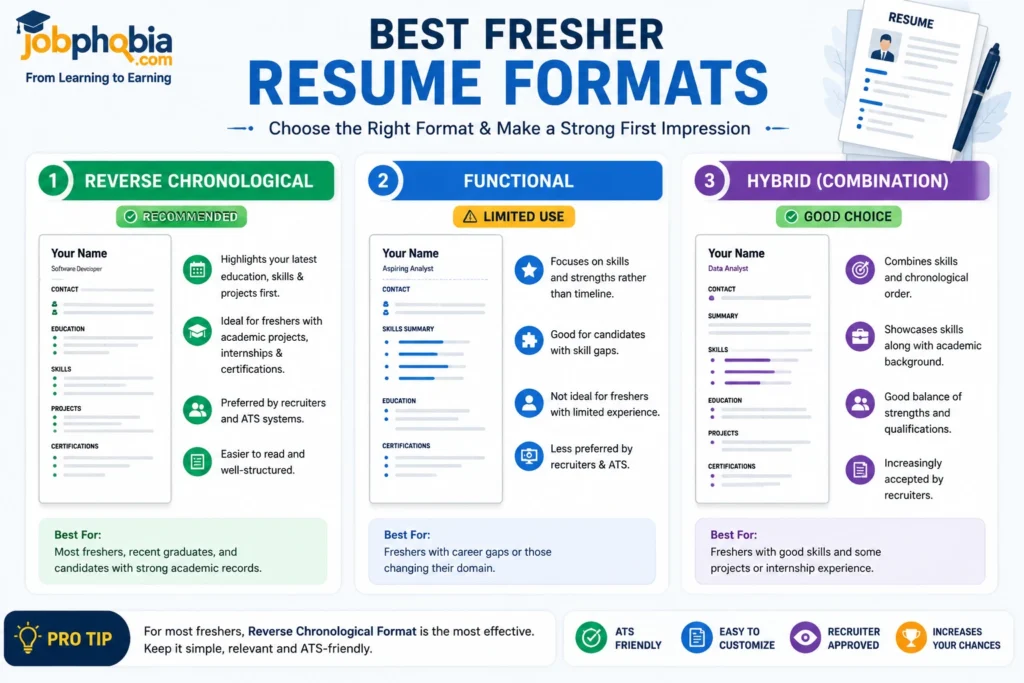
By selecting the right resume format and presenting your qualifications clearly, you’ll improve your chances of getting shortlisted for internships, campus placements, and entry-level job opportunities.
| 📄 Resume Format | ⭐ ATS Compatibility | 🎯 Best For |
|---|---|---|
| ✅ Reverse Chronological | ⭐⭐⭐⭐⭐ Excellent | Freshers & Most Job Seekers |
| ⚠️ Functional | ⭐⭐⭐ Moderate | Career Changers |
| ✅ Hybrid | ⭐⭐⭐⭐ Good | Experienced Professionals |
Essential Sections of a Fresher Resume
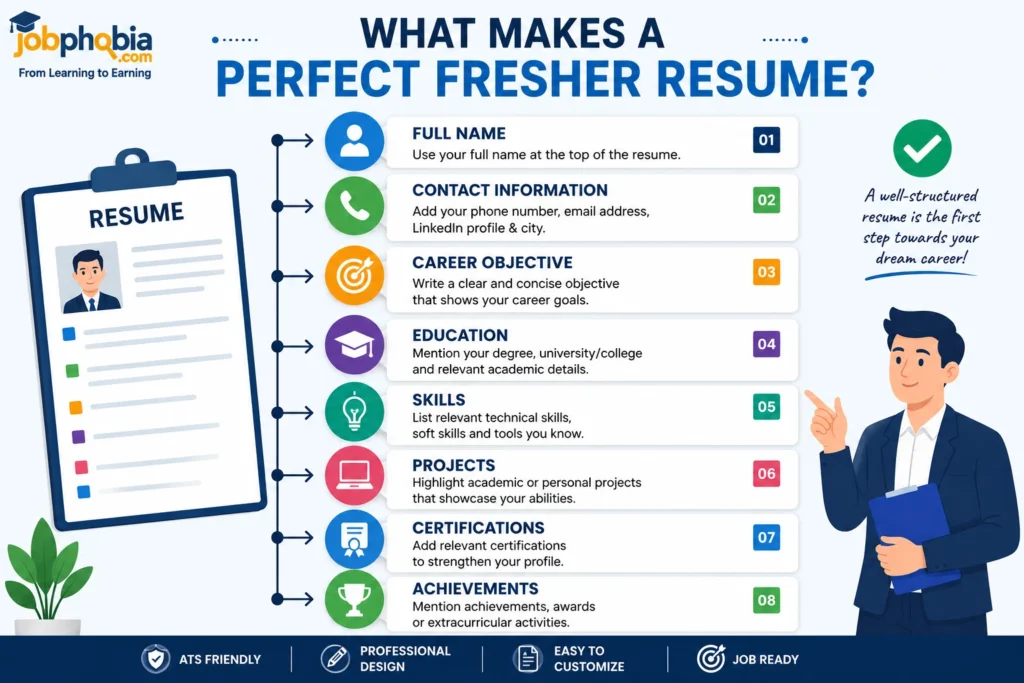
A professional Fresher Resume Format should include all the essential sections that recruiters expect to see. Organizing your information in a clear and logical order makes your resume easier to read and improves ATS compatibility.
Start with your Contact Information, including your full name, phone number, professional email address, and LinkedIn profile (if available). Next, add a Career Objective that briefly explains your career goals and highlights what you can contribute to the company.
Your Education section should include your degree, college or university name, graduation year, and academic achievements. Since freshers often have limited work experience, you can strengthen your resume by adding Projects, Internships, Certifications, and Technical Skills relevant to the job role.
Don’t forget to include a dedicated Skills section. Choosing the right skills is essential for ATS optimization and recruiter visibility. If you’re unsure which skills to include, read our complete guide:
Finally, review your resume carefully to ensure it is well-structured, error-free, and easy to scan. A complete and professional resume gives recruiters confidence in your abilities and significantly improves your chances of getting shortlisted.
| 📌 Resume Section | 📝 What to Include | ⭐ Importance |
|---|---|---|
| 👤 Contact Information | Name, Phone, Email, LinkedIn | ⭐⭐⭐⭐⭐ |
| 🎯 Career Objective | Short career goal and value | ⭐⭐⭐⭐ |
| 🎓 Education | Degree, College, Graduation Year | ⭐⭐⭐⭐⭐ |
| 💼 Internship | Practical work experience | ⭐⭐⭐⭐ |
| 🚀 Projects | Academic or personal projects | ⭐⭐⭐⭐ |
| 🛠️ Skills | Technical & Soft Skills | ⭐⭐⭐⭐⭐ |
| 📜 Certifications | Online or professional certifications | ⭐⭐⭐⭐ |
| 🏆 Achievements | Awards and accomplishments | ⭐⭐⭐ |
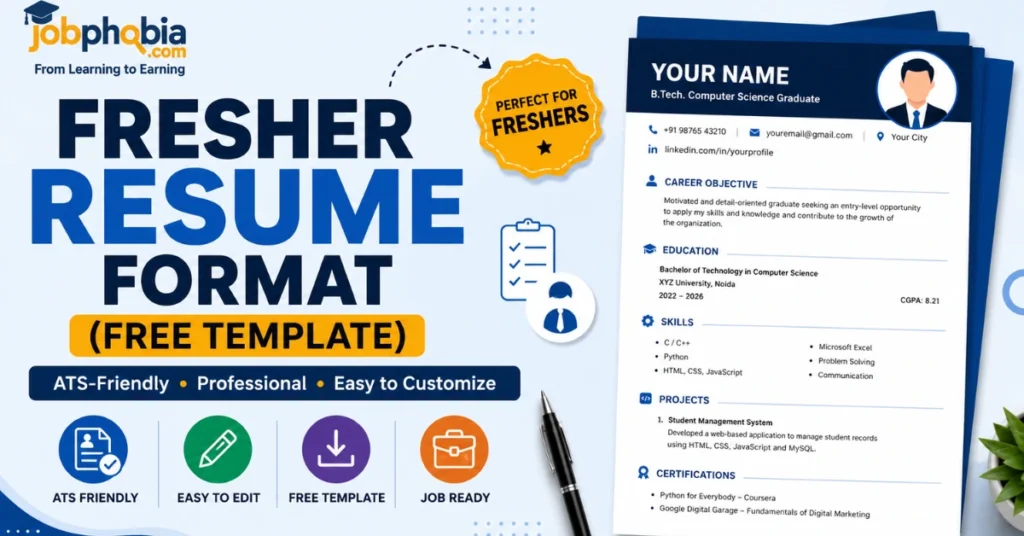
Free ATS-Friendly Fresher Resume Template
Creating a professional resume from scratch can be challenging, especially if you’re applying for your first job. Using an ATS-friendly Fresher Resume Format helps you organize your information in a clean, professional, and recruiter-friendly way. A simple resume template also ensures that your resume can be easily scanned by Applicant Tracking Systems (ATS).
Your resume should include the following sections in the correct order:
- Contact Information
- Career Objective
- Education
- Technical & Soft Skills
- Projects
- Internship (if applicable)
- Certifications
- Achievements
- Languages
- Declaration (Optional)
| 📑 Resume Section | ✅ Recommended | ⭐ Required |
|---|---|---|
| 👤 Contact Information | Yes | ⭐⭐⭐⭐⭐ |
| 🎯 Career Objective | Yes | ⭐⭐⭐⭐ |
| 🎓 Education | Yes | ⭐⭐⭐⭐⭐ |
| 🛠️ Skills | Yes | ⭐⭐⭐⭐⭐ |
| 🚀 Projects | Yes | ⭐⭐⭐⭐ |
| 💼 Internship | If Available | ⭐⭐⭐ |
| 📜 Certifications | Recommended | ⭐⭐⭐⭐ |
| 🏆 Achievements | Recommended | ⭐⭐⭐ |
| 🌐 Languages | Optional | ⭐⭐ |
| ✍️ Declaration | Optional | ⭐ |
Fresher Resume Example
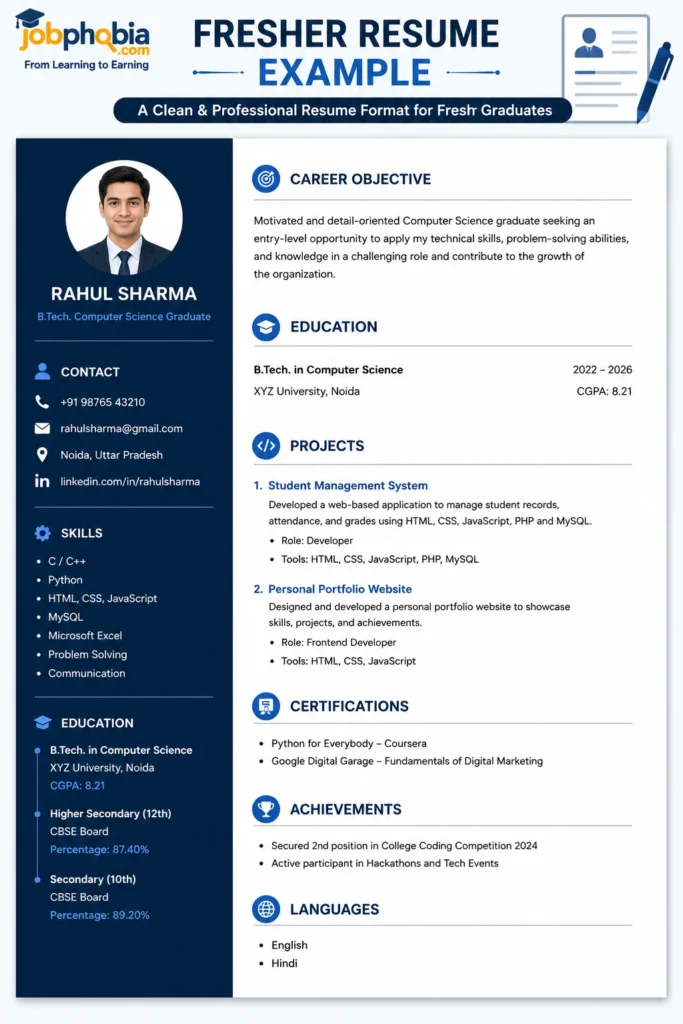
Understanding the right Fresher Resume Format becomes much easier when you see a practical example. A professional resume should present your qualifications in a clear and organized manner while keeping the design simple and ATS-friendly.
Sample Resume Structure
Name
Phone Number | Email Address | LinkedIn Profile | City
Career Objective
A motivated and detail-oriented graduate seeking an entry-level opportunity where I can apply my knowledge, develop new skills, and contribute to the organization’s growth.
Education
Bachelor of Science (B.Sc.) – XYZ University
Graduation Year: 2026
Skills
- Microsoft Office
- Communication
- Teamwork
- Problem Solving
- Time Management
Projects
College Management System
Developed a simple management system as part of the final-year project using modern technologies.
Certifications
- Google Digital Garage
- Microsoft Office Certification
Languages
- English
- Hindi
Common Fresher Resume Mistakes to Avoid
Even the best qualifications can go unnoticed if your resume contains common mistakes. A professional Fresher Resume Format should be clear, accurate, and ATS-friendly. Avoiding these errors can significantly improve your chances of getting shortlisted.
Many freshers make the mistake of using complicated designs, adding irrelevant information, or submitting resumes with spelling and grammar errors. Instead, keep your resume simple, include only relevant skills and achievements, and tailor it for each job application.
| ✅ Do’s | ❌ Don’ts |
|---|---|
| 🎯 Use an ATS-friendly resume format | 🚫 Use fancy graphics or icons |
| ✍️ Proofread before submitting | ❌ Submit a resume with spelling mistakes |
| 📄 Keep the layout clean and professional | 📑 Use inconsistent formatting |
| 🛠️ Add relevant skills and certifications | ⚠️ Include irrelevant information |
| 📌 Customize your resume for each job | 📋 Send the same resume to every employer |
| 📧 Use a professional email address | 😅 Use an unprofessional email ID |
| 📈 Highlight projects and achievements | 📉 Leave important sections incomplete |
Pro Tips for Creating a Fresher Resume
Creating a strong Fresher Resume Format requires more than just listing your qualifications. A professional resume should be tailored to the job, easy to read, and optimized for both recruiters and Applicant Tracking Systems (ATS). Follow these expert tips to make your resume stand out from the competition.
- ✅ Customize your resume for every job application.
- 🎯 Use relevant keywords from the job description naturally.
- 📄 Keep your resume to one page unless additional information is necessary.
- 🛠️ Highlight your skills, projects, and certifications to showcase your abilities.
- 📚 Use a clean and professional layout with standard fonts and headings.
- ✍️ Proofread your resume carefully to remove spelling and grammar mistakes.
- 📧 Use a professional email address and ensure your contact details are up to date.
- 🚀 Update your resume regularly by adding new skills, certifications, and achievements.
Following these best practices will help you create a professional, ATS-friendly resume that leaves a positive impression on recruiters and increases your chances of securing interviews.
Fresher Resume Checklist
Before submitting your resume, make sure you’ve completed the following checklist. A well-prepared Fresher Resume Format should be accurate, ATS-friendly, and tailored to the job you’re applying for.
| ✅ Checklist | ✔️ Status |
|---|---|
| 👤 Added complete contact information | ☐ Check |
| 🎯 Included a clear career objective | ☐ Check |
| 🎓 Mentioned education details correctly | ☐ Check |
| 🛠️ Added relevant technical and soft skills | ☐ Check |
| 🚀 Included academic projects or internships | ☐ Check |
| 📜 Listed certifications and achievements | ☐ Check |
| 📄 Used a clean ATS-friendly resume format | ☐ Check |
| ✍️ Proofread for spelling and grammar errors | ☐ Check |
| 🔑 Added job-specific keywords | ☐ Check |
| 📧 Saved the resume in the required format (PDF/DOCX) | ☐ Check |
Reviewing this checklist before applying can help you avoid common mistakes and ensure your resume is ready for recruiters and Applicant Tracking Systems (ATS).
Important Link for Updates
| Platform | Details |
|---|---|
| ➡️WhatsApp Channel | Click Here |
| ➡️Telegram Page | Click Here |
| ➡️LinkedIn Page | Click Here |
| ➡️Facebook Group | Click Here |
Some Useful Links
| Section | Useful Links |
|---|---|
| Courses for Skill Development | View All Courses |
| General Knowledge – National Parks | National Parks in India |
| General Knowledge – First in India | Top 100 Questions on “First in India” with Answers |
| General Knowledge – Ancient History MCQs | Indian Ancient History MCQs Quiz |
| General Knowledge – Indian Polity MCQs | Indian Polity MCQs Quiz |